
Start here
Every POS terminal needs this setup once before you can use anything else on the POS. It takes about 15 minutes. Do the steps in order.
| Step | Where | Time |
|---|---|---|
| 1. Find your POS terminal's pairing PIN and your staff PIN | Back Office | 5 min |
| 2. Get the app on the device | The device | 2 min |
| 3. Pair the POS | The POS | 1 min |
| 4. Sign in | The POS | 1 min |
| 5. Connect your printer and card reader | The POS | 5 min |
| 6. Test, then start your shift | The POS | 2 min |
Before you start
Tick these off first. Most setup problems come from one of them.
- You can sign in to Back Office as an owner or manager.
- The device is on the internet. A network cable (Ethernet) is the most reliable; Wi-Fi works too.
- The device is one of these:
- a Sunmi terminal,
- an Android tablet (Android 8 or newer, 8-inch screen or bigger, used sideways),
- a Windows PC (Windows 10 version 1809 or newer, or Windows 11, 64-bit), using the MyFoodFast POS app from the Microsoft Store, or
- a Mac with the Chrome browser.
- Printing from a Mac? You'll install a free helper called JSPrintManager in Step 2. Without it, the web POS can't print. The Windows app doesn't need it.
Note: Phones aren't supported. An iPad or Chromebook can open the web POS and take orders, but it cannot print. Use it as an extra order screen next to a POS terminal that prints.
Step 1: Find your POS terminal's pairing PIN and your staff PIN in Back Office
When you sign up, we create your first POS terminal for you. It's called T1, and it already has a pairing PIN, so you don't need to add a terminal for your first device.
Note: These pages belong to your store. If Back Office says Please select a store first, click your store name at the top of the page and choose Click to enter store, then try again.
Your POS terminal's pairing PIN
- In Back Office, go to Setup > In-Store > POS Terminals.
- Check Send orders to MyFoodFast POS is switched on at the top of the page. If it's off, orders never reach the POS.
- Find T1 in the list. Its 6-digit pairing PIN is in the PIN column. Keep this page open; you'll type the PIN in Step 3.
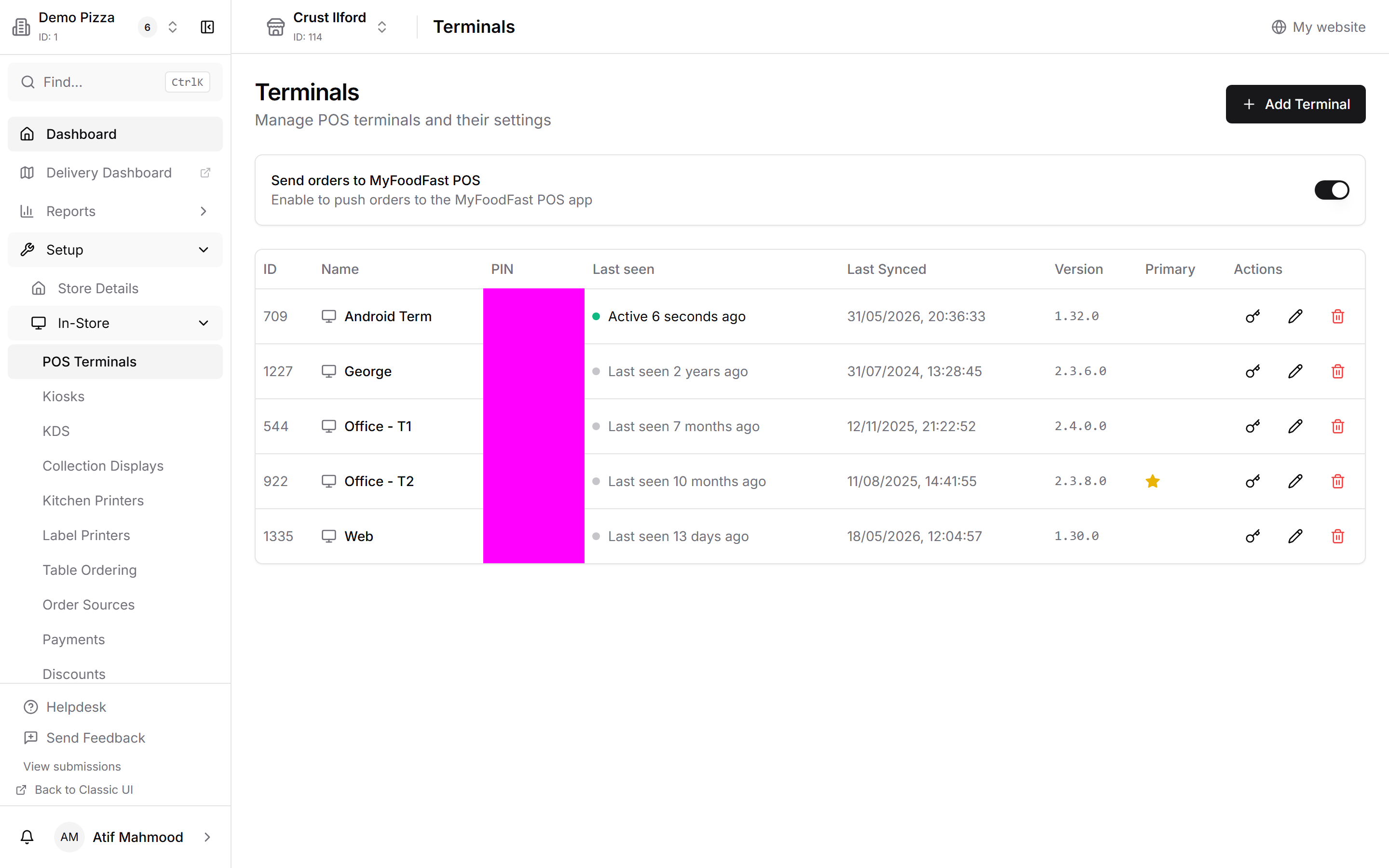
Tip: Setting up more than one POS? Use T1 for the first device, then click Add Terminal for each extra one and give it a clear name such as Front counter. One terminal per device makes printers, reports and support much easier.
Your staff PIN
Nobody can use the POS without a 4-digit staff PIN. Your store already has two staff members:
- Admin, with the Admin role. Use it to sign in to the POS for the first time.
- Driver One, with the Driver role. It's there so you can try a delivery order from start to finish, including assigning a driver. Rename it to one of your drivers, or delete it when you no longer need it.
To see or change a PIN, or to add your own staff:
- Go to Management > Staff > Staff List.
- Open Admin. Under Security, check the PIN Number. We recommend changing it to one only you know: type a new one or click Generate, then save.
- To add someone else, click Add Staff, fill in their PIN the same way, and save.
- Give at least one person the Manager role. Refunds, discounts and some settings need a manager's PIN.
See Staff and User Management in Back Office v2 for roles and permissions.
Step 2: Get the app on the device
Pick the one that matches your device.
Sunmi terminal from MyFoodFast
Nothing to install: the POS is already on it and opens by itself when you switch it on. Plug in the network cable (or join Wi-Fi) and go to Step 3. For unboxing help, see Set up your Sunmi terminal.
Your own Sunmi or Android tablet
- Open the Sunmi App Store (Sunmi) or Google Play Store (other tablets).
- Search for MyFoodFast POS and tap Install. It may be listed as POS; it's the same app.
- Open it and go to Step 3.
Windows PC
- Open the Microsoft Store app on the PC (or go to apps.microsoft.com/detail/9P5007XTF1QR).
- Search for MyFoodFast POS and click Get (or Install). It's free.
- Open MyFoodFast POS from the Start menu and go to Step 3. To open it quickly every day, right-click its icon on the taskbar and choose Pin to taskbar.
The Windows app prints straight to network printers by IP address, the same as an Android POS, so you don't need JSPrintManager. Use a printer connected by network cable or Wi-Fi; USB printers don't work with the Windows app. The Microsoft Store keeps the app up to date by itself. Full guide, including moving over from the web POS: Install MyFoodFast POS on a Windows PC.
Note: Can't use the Microsoft Store on that PC (for example, a work PC where the Store is blocked)? Use the web POS instead, as described for a Mac below.
Mac (or a PC without the Microsoft Store)
- Open Chrome and go to https://myfoodfast-pos.web.app/.
- Install it as an app so staff can open it from the desktop: click the install icon at the right of the address bar, then Install. If you can't see the icon, open Chrome's ⋮ menu and choose Cast, save and share > Install page as app.
- To print, install JSPrintManager v6 on the same computer: download it from neodynamic.com/downloads/jspm/?v=6, run the installer, and leave it running. It starts with the computer from then on.
Note: JSPrintManager only prints from the computer it's installed on. Every computer that runs the web POS and needs to print must have its own copy. See Set up printers for more.
Step 3: Pair the POS
When the POS opens for the first time, it shows Pair this terminal and Not paired yet at the top.
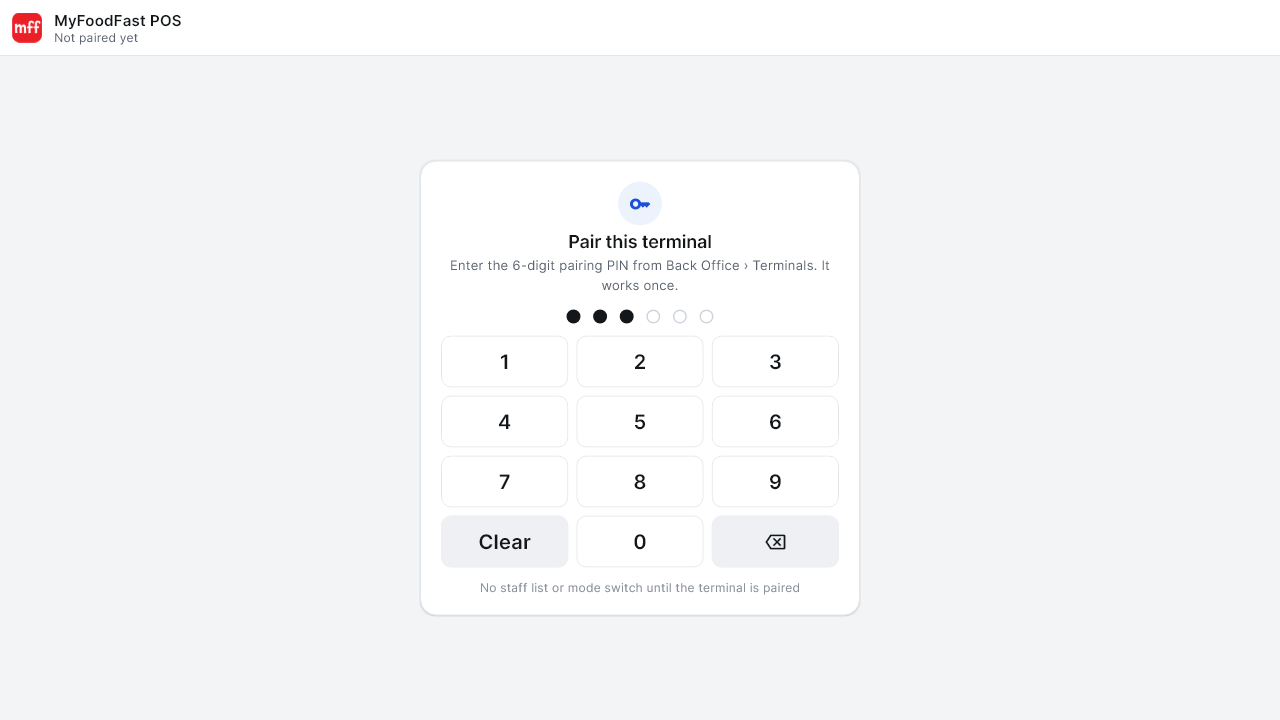
- Type the 6-digit pairing PIN from Step 1.
- There's no button to press. After the sixth digit the POS shows Checking… and pairs by itself.
- The staff sign-in screen appears. You only do this once per POS.
Note: Each pairing PIN works once. If it's rejected, or you've used it already, go back to Setup > In-Store > POS Terminals in Back Office and click Get new PIN under Paired in the PIN column next to the POS.
Step 4: Sign in
- On Enter your PIN, make sure Sign in is selected at the top.
- Type your 4-digit staff PIN from Step 1. It signs you in on the fourth digit.
- The order screen opens with your menu.
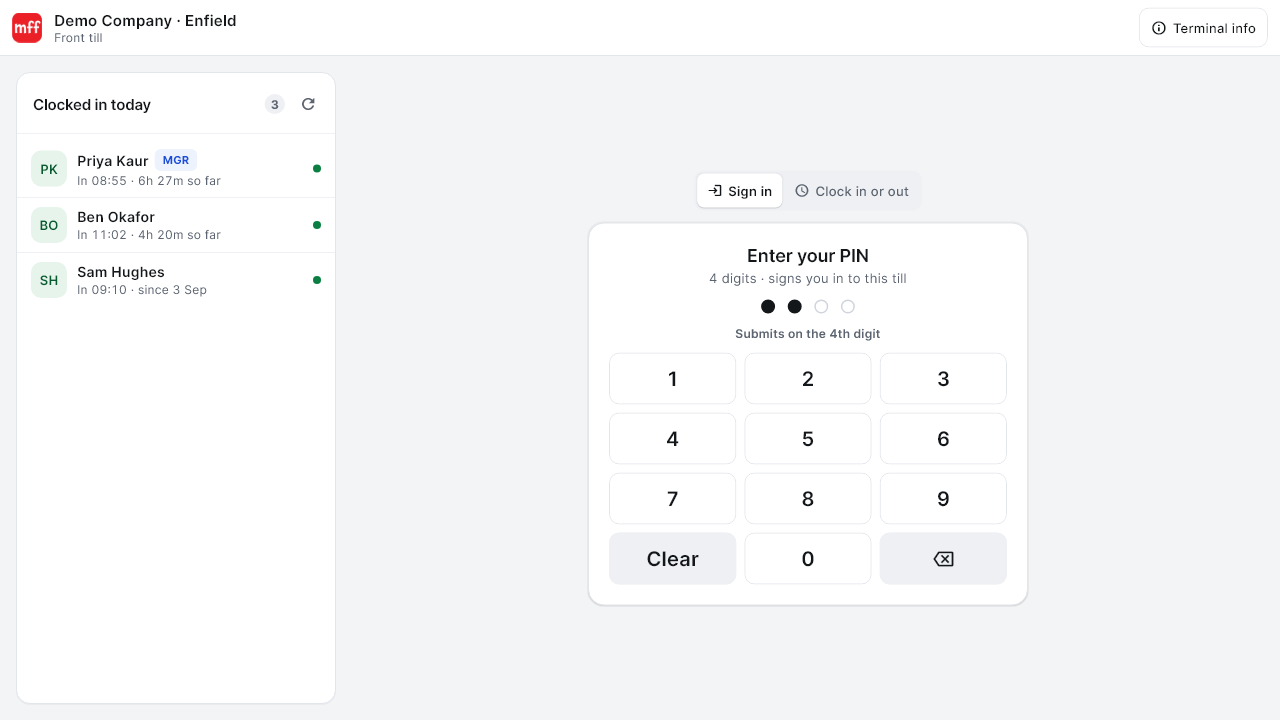
More detail, including clocking in: Signing in and clocking in.
Step 5: Connect your printer and card reader
You can skip this and come back later, but you'll need a printer before your first real order.
Printer
- Switch the printer on and connect it to the same network as the POS.
- On the POS, tap the gear at the right of the header, then Printers.
- Tap Discover printers, pick your printer from the list, then tap Test print.
- Do the same for each card: Customer receipts, plus Kitchen or Dispatch if you use them. The Printers label on the left shows a number until every printer is chosen.
On a Sunmi with a built-in printer, a green notice confirms it was found. If your printer isn't listed, tap Enter IP. Full guide: Set up printers.
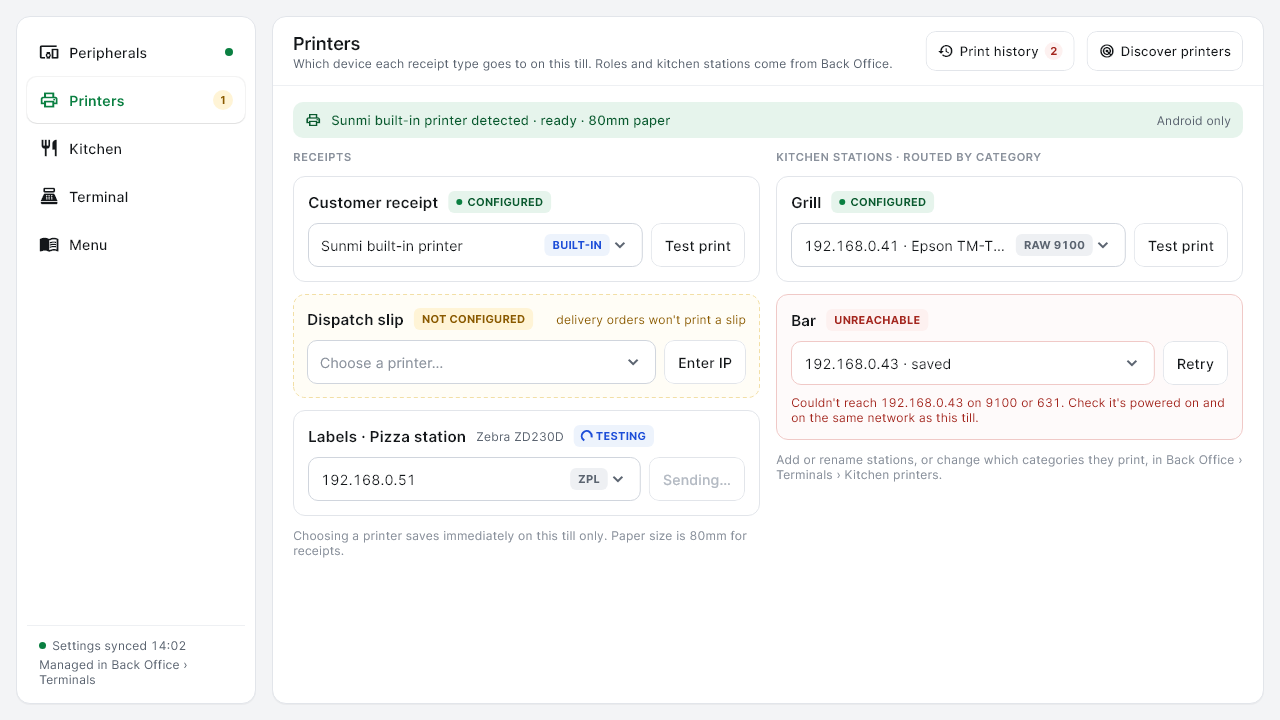
Note: Bluetooth printers aren't supported. A cash drawer plugs into the customer receipt printer.
Card reader (optional)
Card readers use your Stripe account, so connect Stripe first in Back Office under Setup > Integrations > Stripe, then tick it as a payment method under Setup > In-Store > Payments.
- WisePad 3 (small Bluetooth reader, Android and Sunmi only): see Set up your WisePad 3 card reader.
- WisePOS E (countertop reader, works on any POS including the Windows app and the web POS): see Take card payments with a WisePOS E.
Step 6: Test, then start your shift
- Check your menu is showing.
- Put through a small test order and take payment in cash.
- Check the receipt prints and the order appears on Track.
- If you set up a card reader, run a small card payment and then refund it.
- Tap Start shift in the header, count the cash in the drawer, and start your shift. See Opening your shift.
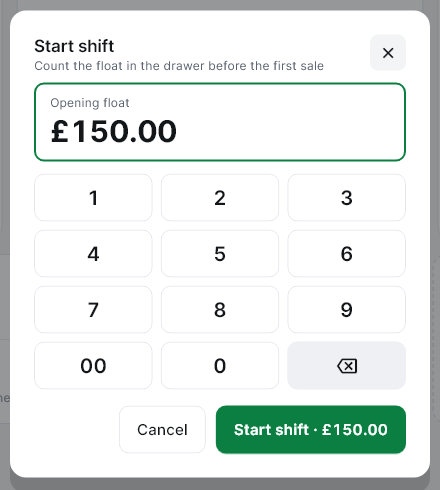
That's it. For each extra POS terminal, click Add Terminal in Setup > In-Store > POS Terminals, then repeat Steps 2 to 5 with that POS terminal's PIN. Staff PINs only need setting up once; they work on every POS terminal in the store.
If something goes wrong
The pairing PIN is rejected Each PIN works once. Get a new one in Setup > In-Store > POS Terminals by clicking Get new PIN in the POS's PIN column and type it again: six digits, no spaces.
"Connection error. Please check your internet and try again." The POS isn't online. Check the network cable or Wi-Fi, then try again.
"That PIN didn't match" on the sign-in screen That's the staff PIN, not the pairing PIN. Check it in Management > Staff > Staff List.
The whole screen says "Store disabled" This is an account issue, not a setup problem. See The "Store Disabled" screen.
A red bar says "Display size is set too large for this screen" Set Android's Display size back to Default. See Display size is set too large.
Windows: the Microsoft Store won't install MyFoodFast POS The app needs Windows 10 version 1809 or newer (or Windows 11) on a 64-bit PC. Check under Settings > System > About, run Windows Update, then try again. If the Store is blocked on that PC, use the web POS instead.
Windows: a printer isn't found The Windows app only prints to network printers. Connect the printer to the same network as the PC by cable or Wi-Fi, then tap Discover printers again or use Enter IP. See Set up printers.
The web POS says "JSPrintManager Not Found" JSPrintManager isn't installed or isn't running on this computer. Click Download JSPM, install it, then click Retry.
Orders from your website aren't reaching the POS Check Send orders to MyFoodFast POS is on in Setup > In-Store > POS Terminals, and that the POS shows a recent Last seen time there.
The menu is missing or out of date Menu changes made in Back Office reach the POS by themselves, usually within a minute, once no order or payment is open on it. Setup > In-Store > POS Terminals in Back Office shows whether each POS terminal is Up to date in the Menu column. If a POS terminal still looks wrong, tap the gear, then Menu > Refresh menu to download the whole menu again.
Moving a POS terminal to a different store, or replacing it Tap the gear, then Terminal > Unpair this terminal… and enter a manager PIN. Then pair it again with a new PIN from the other store's Back Office.
Tip: Still stuck? Tap Terminal info on the sign-in screen and send support the store, terminal name and app version shown there.