
Before you start
A Sunmi terminal from MyFoodFast comes with the POS already installed, and the POS opens by itself every time you switch the terminal on. You don't need to download anything.
You'll need:
- The POS terminal's 6-digit pairing PIN. Get it in Back Office under Setup > In-Store > POS Terminals: click Add Terminal, and the PIN appears in the PIN column. If the column says Paired, that terminal is already in use: click Get new PIN for a fresh one, or add a new terminal.
- At least one 4-digit staff PIN, set under Management > Staff > Staff List.
- A network cable (recommended), or your Wi-Fi name and password.
If you haven't done the Back Office part yet, do Step 1 of Start here: set up MyFoodFast POS first.
Note: Is this a Sunmi you bought yourself, not one we supplied? Open the Sunmi App Store (orange shopping-bag icon), search for MyFoodFast POS (it may be listed as POS), and tap Install. Then follow the steps below.
Set up the terminal
- Unbox it. Check you have the terminal and its power adapter.
- Plug in the network cable. It goes in the back of the terminal. The terminal connects by itself, and uses the cable rather than Wi-Fi when both are available.
- Switch it on. Plug in the power and hold the power button for about 3 seconds. Once the terminal has started, the POS opens by itself.
- No cable? Join Wi-Fi. Tap the Wi-Fi icon in the black bar along the bottom of the screen, on the left. A panel opens with Wi-Fi and Ethernet tabs. Tap your network, type the password, then tap anywhere outside the panel to go back to the POS. If the bottom bar is hidden, swipe up from the bottom edge to show it.
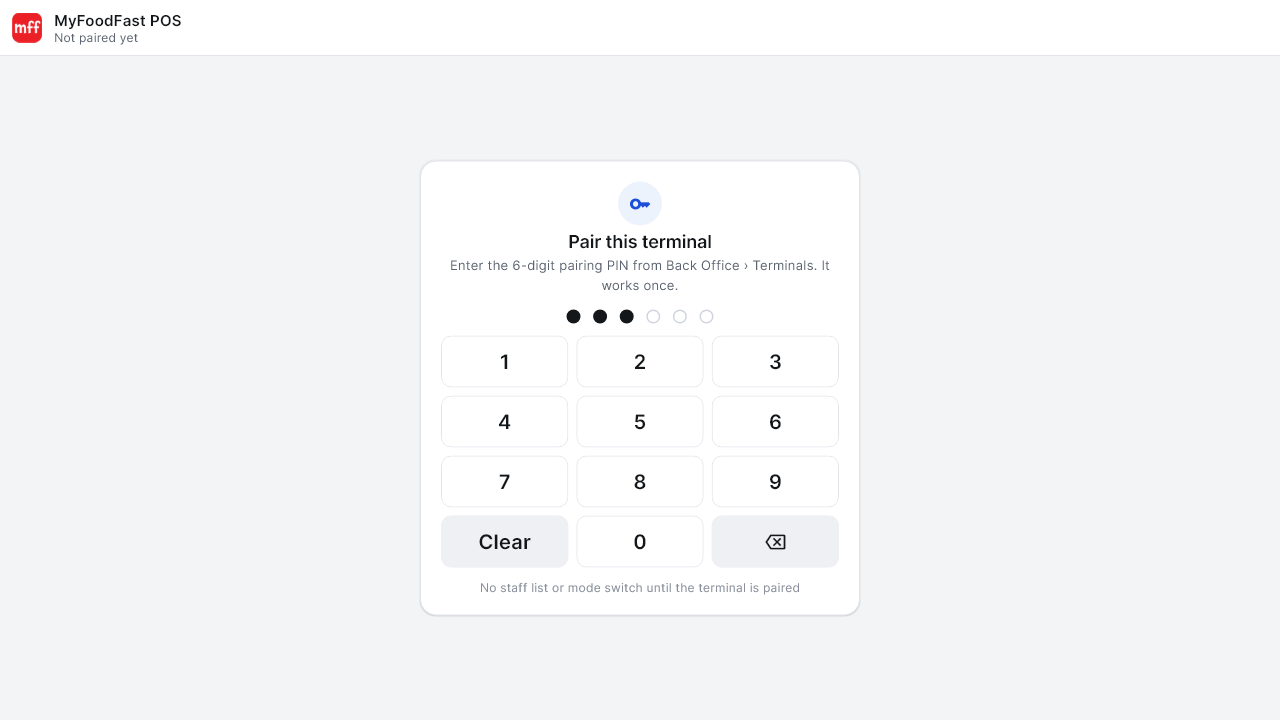
- Pair the POS. The POS shows Pair this terminal. Type the 6-digit pairing PIN. The POS pairs by itself after the sixth digit.
- Sign in. On Enter your PIN, type your 4-digit staff PIN.
Your menu loads and the POS is ready. Next, connect your printer and card reader: see Step 5 of Start here.
Tip: Turn on Remote Assistance while you're setting up. Then our support team can help straight away if anything goes wrong later.
Test it
- Put through a small test order.
- Check the order appears on Track and the receipt prints.
Troubleshooting
The POS doesn't open after switching on
- Wait 30 seconds. It can take a moment after a restart.
- Restart the terminal: hold the power button, then tap Restart.
- If it still doesn't open, swipe up on the home screen to open the app list, and tap MyFoodFast POS (the red icon).
The pairing PIN doesn't work
Each PIN works only once. In Back Office, go to Setup > In-Store > POS Terminals and click Get new PIN under Paired in the PIN column next to the POS. Then type the new PIN. Any device already paired to that terminal keeps working.
"Connection error. Please check your internet and try again."
The terminal isn't online. Check the network cable is clicked in, or rejoin Wi-Fi (step 4 above).
A red bar says "Display size is set too large for this screen"
See Display size is set too large.
Need help?
Email help@myfoodfast.com or use the live chat on this site. Tell us the terminal's serial number. It's on the sticker underneath, and it's also shown as SN Number in the Remote Assistance app.